
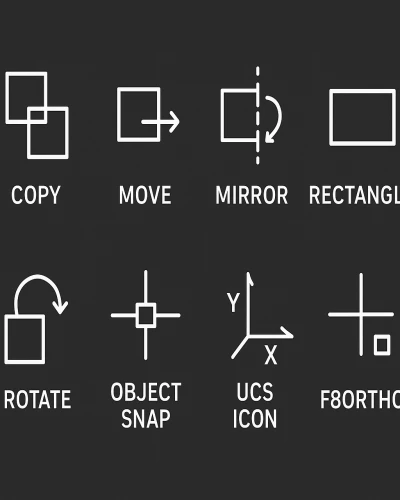
AutoCAD में drawing create और modify करने के लिए कई basic commands हैं। ये commands objects को copy, move, mirror, rotate, scale करने और viewport और coordinate system manage करने के लिए उपयोगी हैं।
इस ब्लॉग में हम AutoCAD के सबसे जरूरी Basic Commands को step-by-step सीखेंगे।
1. Mirror Command (MI)
MI-(Mirror)
Select Object
Mirror First Point
Mirror Second Point
Erase Source Object :Yes or No]<N>:
2. Copy Command (CO)
Co-(Copy)
Select Object
Base Point
Next Point...........Continue
B) Co enter
select object
base point
a enter
no. of array
second point : @x,y
enter
Ctrl+z(Undo)
Ctrl+Y(Redo)
Co - (copy)
Select Object
Base Point
2nd Point @ X,Y;k
@ Distance Angle -
3. Move Command (M)
M - (Move)
Select Object
Base Point
2nd Point
OS
[Snap Point (F3)]
Select Snap
Select All
Ok
4. Rectangle Command (REC)
Rectangle
Rec enter
Start Point : Click or use fro
Other Corner Point : @x,y
5. Rotate Command (RO)
RO enter
select objects
base point
Angle
enter
RO enter
select objects
base point
c enter (copy)
Angle
enter
6. UCSICON Command
UCSICON
1. UCSICON - ENTER
off
2. UCSICON - ENTER
ON
3. UCSICON - ENTER
n enter
no origin
4. UCSICON - ENTER
or enter
origin
5. UCSICON - ENTER
p enter
properties (Size, Color Etc.
6. UCSICON - ENTER
s enter
selectable : Yes/ No
7. Viewport Configuration
= View
Viewport Configuration
Single / Two : Vertical / Two : Horizontal / Three Right / Three Left / Three Above / Three Below / Three Vertical / Three Horizontal / Four : Equal / Four : Right / Four : Left
8. Mocoro (Modify Shortcuts)
Mocoro
Select object enter
base point
a) M enter
Move
b) C enter
Copy
c) R enter
Rotate
d) S enter
Scale
e) U enter
undo
f) B enter
base point - pick point position
= Ortho on /off
F8
AutoCAD के ये basic commands drawing create और modify करने में मदद करते हैं।
Mirror, Copy, Move, Rotate, Rectangle basic geometry commands हैं।
UCSICON और Viewport coordinate और layout manage करने के लिए उपयोगी हैं।
Ortho Mode और Mocoro shortcuts drawing को fast और accurate बनाते हैं।
Thanks to Google
🤖 AI Tools & Technology Credits
इस लेख को आसान, स्पष्ट और उपयोगी बनाने के लिए आधुनिक AI तकनीकों की सहायता ली गई है।
इन टूल्स की मदद से रिसर्च, कंटेंट लेखन, डिजाइन, SEO और वीडियो क्रिएशन तेज़, सटीक और प्रोफेशनल तरीके से किया गया है।
हम इन सभी AI प्लेटफॉर्म्स का आभार व्यक्त करते हैं जिन्होंने सीखने और सिखाने की प्रक्रिया को सरल और प्रभावी बनाया।
यदि आप भी ब्लॉग, स्टडी नोट्स, प्रोजेक्ट या डिजिटल कंटेंट बनाना चाहते हैं, तो इन टूल्स का उपयोग अवश्य करें:
🔹 OpenAI ChatGPT – AI Content Writing & Ideas
https://chat.openai.com
🔹 Google Gemini – Smart Research Assistant
https://gemini.google.com
🔹 Canva – Graphics & Design Creation
https://www.canva.com
🔹 Google Flow – AI Video Creation Tool
https://labs.google/flow
🔹 InVideo – AI Video Maker & Reels Creator
https://invideo.io
🔹 Ubersuggest – SEO & Keyword Research Tool
https://neilpatel.com/ubersuggest
🔹 Remove.bg – Background Remover for Images
https://remove.bg
🔹 ElevenLabs – AI Voiceover Generator
https://elevenlabs.io
🔹 Microsoft Copilot – Documents & Office Productivity AI
https://copilot.microsoft.com
✨ AI tools के साथ सीखें, तेज़ी से बढ़ें और अपने काम को प्रोफेशनल बनाएं।
— Team Health Wealth Vaastu
Copyright © 2026 Health Wealth Vaastu All rights reserved
Privacy Policy Terms & Condition Refund & Cancellation Site Map
all comments