
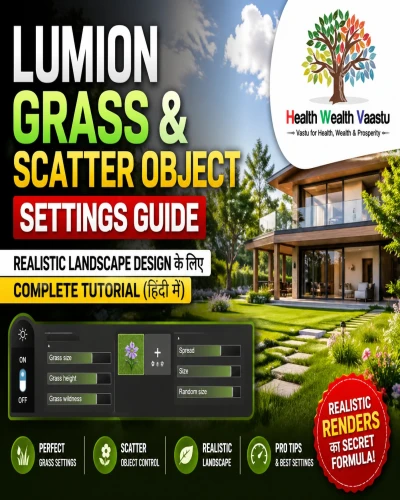
🌿 1. Grass Settings – Basic लेकिन Powerful
🔘 ON / OFF
📏 Grass Size (फैलाव)
👉 घास कितनी जगह में फैलेगी
📐 Grass Height (ऊँचाई)
👉 घास की लंबाई
🌱 Grass Wildness (Natural Look)
👉 घास कितनी random दिखेगी
🌸 2. Scatter Object – Realism का Secret Weapon
Grass से base बनता है, लेकिन realistic scene तब बनता है जब आप छोटे objects add करते हैं।
🔍 Scatter Object क्या है?
👉 यह feature selected object (flowers, plants, bushes) को terrain पर automatically random तरीके से फैला देता है।
⚙️ Scatter Settings Explained
🌼 Object Selection
Flower / plant / bush select करें
📊 Spread (फैलाव)
Object कितने area में फैलेगा
🔘 Size (आकार)
Objects का base size
🔀 Random Size (Variation)
Size में variation लाता है
👉 High = ज्यादा natural look
🎯 Best Professional Settings
🏡 Residential Projects
👉 Clean lawn look
🌳 Natural Landscape
👉 Ultra realistic nature
🏢 Commercial Projects
👉 Premium & professional feel
⚠️ Performance Tips
🧠 Expert Tips (Game Changer)
✔ Grass + Scatter combo use करें
✔ Terrain थोड़ा uneven रखें
✔ Lighting और shadow सही रखें
✔ Camera low angle रखें
🔚 Conclusion
Lumion में realistic render बनाने का secret simple है:
👉 Grass + Scatter Object का सही balance
अगर आप इन settings को सही तरीके से use करते हैं, तो आपका design बिल्कुल real-life जैसा दिखेगा।
💡 About Health Wealth Vaastu
Health Wealth Vaastu सिर्फ वास्तु सलाह नहीं देता, बल्कि modern tools और design understanding के साथ space को energy + aesthetics दोनों में optimize करता है।
अगर आप चाहते हैं:
✔ Lumion advanced training
✔ Realistic render presets
✔ या AI + design courses
तो हमसे जुड़ें।
🤖 AI Tools & Technology Credits
इस लेख को आसान, स्पष्ट और उपयोगी बनाने के लिए आधुनिक AI तकनीकों की सहायता ली गई है।
इन टूल्स की मदद से रिसर्च, कंटेंट लेखन, डिजाइन, SEO और वीडियो क्रिएशन तेज़, सटीक और प्रोफेशनल तरीके से किया गया है।
हम इन सभी AI प्लेटफॉर्म्स का आभार व्यक्त करते हैं जिन्होंने सीखने और सिखाने की प्रक्रिया को सरल और प्रभावी बनाया।
यदि आप भी ब्लॉग, स्टडी नोट्स, प्रोजेक्ट या डिजिटल कंटेंट बनाना चाहते हैं, तो इन टूल्स का उपयोग अवश्य करें:
🔹 OpenAI ChatGPT – AI Content Writing & Ideas
https://chat.openai.com
🔹 Google Gemini – Smart Research Assistant
https://gemini.google.com
🔹 Canva – Graphics & Design Creation
https://www.canva.com
🔹 Google Flow – AI Video Creation Tool
https://labs.google/flow
🔹 InVideo – AI Video Maker & Reels Creator
https://invideo.io
🔹 Ubersuggest – SEO & Keyword Research Tool
https://neilpatel.com/ubersuggest
🔹 Remove.bg – Background Remover for Images
https://remove.bg
🔹 ElevenLabs – AI Voiceover Generator
https://elevenlabs.io
🔹 Microsoft Copilot – Documents & Office Productivity AI
https://copilot.microsoft.com
🔹 iLovePDF – PDF Edit, Convert & Merge Tool
https://www.ilovepdf.com/
✨ AI tools के साथ सीखें, तेज़ी से बढ़ें और अपने काम को प्रोफेशनल बनाएं।
— Anil Computers Team
Copyright © 2026 Health Wealth Vaastu All rights reserved
Privacy Policy Terms & Condition Refund & Cancellation Site Map
all comments
Payal Acharjee
25-July-2026The topic , latest lumion 12.5 sounds difficult , but after reading and understanding the topic , it was very easy to understand .
Reply